
Year 6 Learning from Home Week 1 Term 4
Week beginning – 5 October 2020
We will be reviewing our Week 1 LFH plan during our Webex Essential Meeting on Monday.
During each week, there will be specific tasks that we would like you to photograph and/or upload
These tasks are highlighted like this.
These will need to be sent to your classroom teacher via Google Classroom. They will be used to provide feedback during Learning from Home, in addition to Webex sessions.
Work or items to be brought to Webex Essential sessions are highlighted like this.
Daily Webex Essential sessions:
9.00am-9.45am: Group 1
10.00am-10:45am: Group 2
You may be asked to attend additional sessions throughout the week. Your teacher will let you know.
Webex Essential Schedule
Below is a list of what we plan to do in our Webex Essential sessions:
Monday: Organisation: LFH Planner/Timetable (Reviewing)
Tuesday: Reading: Reading Log and Tracks of Thinking (Reviewing)
Wednesday: Maths: School Canteen (Teaching)
Thursday: Wellbeing: Cybersafety (Teaching)
Friday: Inquiry: Buildings and their environment (Reviewing)
Uploaded Tasks for Feedback:
Thursday: Reading: Reading Log and Tracks of Thinking
Wellbeing
Cyber safety
Cybersmart Forever – how to share content online in a safe way
Learning Intentions:
To identify how to safely share images and content online
To describe ways to protect the safety of images online
To recognise the risks of ‘friending’ people online
To know when and how to seek help online
Task:
This session will be taught during Webex Essential on Thursday
This week we are going to be watching a video in our Webex Essential session on Thursday.
Following the video and a discussion, you will be able to complete the following task here.
Reading
Learning Intention:
To explore the features of a biography
Tasks:
Daily Independent Reading with tracks of your thinking
This session will be reviewed during Webex Essential on Tuesday.
This week, we would like you to focus on getting back into regular reading routines and avoiding distractions while you read your Just Right book. This could include texts selected from Epic! ActiveLearn, other online library sources, books, magazines or newspapers you have at home. The book doesn’t have to be very long.
You will be assigned new books this week in ActiveLearn to practise your fluency. You are expected to read these books and record them in your reading log. You also need to complete the bug quizzes throughout the text so the book is completed and moves into your personal library.
It is an expectation to detail what you are reading in your Reading Log and leave tracks of your thinking, just like we would be doing at school. For example, questions, wonderings, predictions, inferences, connections or visualisations.
You will find a template of a reading log in Google Classroom.
(45 minutes a day)
Success Criteria (what we are looking for to provide feedback):
- I have clearly recorded my reading in a reading log, including all necessary information
- I have provided tracks of my thinking for each day that reflects deeper thinking
- I have demonstrated a range of thinking strategies in the tracks of my thinking, such as wonderings, predictions, inferences, connections, visualisations or author’s craft
Task:
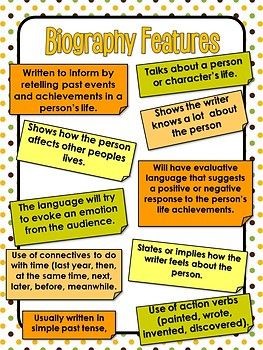
Exploring Biographies
Below is an anchor chart which identifies the purpose and features of a biography. Read this, then complete the following task.
Log in to Epic!
Type ‘biographies’ into the search bar.
You should see a wide range of biographies.
Throughout the week, read 3 different biographies. Complete the table below for each.
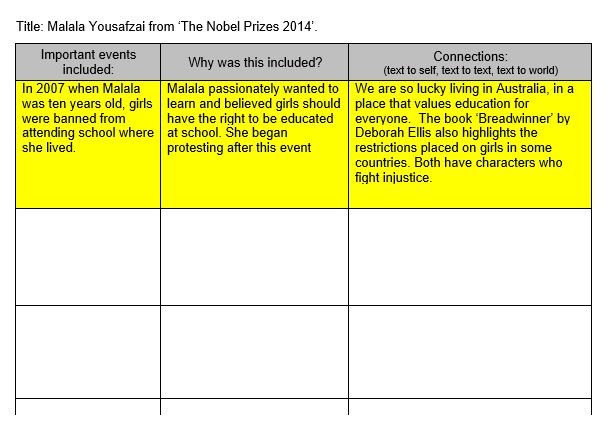
(45 minutes a day x 3)
Writing
Learning Intentions:
To complete a biography template, identifying the correct structure and features
To identify and record key facts about a person
Task:
Questions for my Icon?
Who is someone you look up to and admire?
Assuming you already know some details of their lives, what insightful questions would you ask them if you had the opportunity?
Level 1 – 5 questions
Level 2 – 10 questions
For example,
-Mrs Sime would like to ask Anna Mears, ‘What was going through your mind when you were racing Victoria Pendleton in the 2012 Olympics?’
-Mrs Rovatti would like to ask Roald Dahl, ‘Were the characters in your books based on people you knew?’
-Miss Mahon would like to ask Michelle Obama, ‘How do you inspire young women to know that they can achieve anything?’
-Mr Mottershead would like to ask John Deacon from the band Queen, ‘Why did you choose to retire after the death of lead singer Freddy Mercury, as the rest of the band members continued performing?’
(20 minutes)
Task:
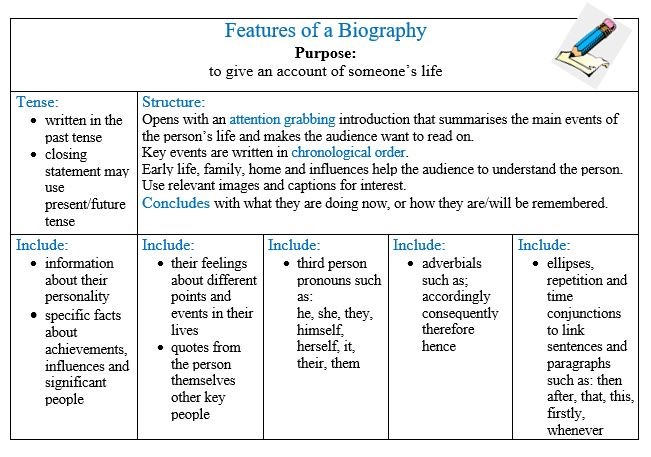
Identifying and Recording Facts About a Famous Person
Below is an anchor chart which outlines the purpose, structure and language features of a biography.
Below is a collection of famous people.
Log on to ClickView and watch the first few minutes of each video below to find out how each person became famous.
Choose one person from above and finish watching the video.
Use the template provided below to organise biographical information about your chosen person:
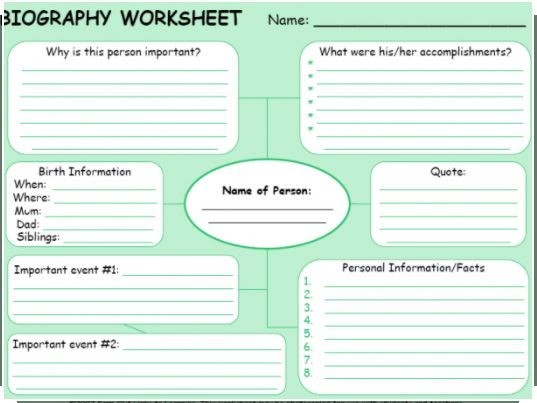
(40 minutes)
Spelling
Learning Intention:
To revise suffixes
To revise how suffixes can change the meaning and tense of words
Definitions:
A suffix is a letter or group of letters attached to the end of a base word to change its meaning or tense.
For example ‘ed’, ‘ful’, ‘y’, ‘ly’, ‘ing’.
A base word or root word cannot be broken down. It gives a word its basic meaning.
For example, ‘wash’, ‘thick’ and ‘flat’.
Tasks:
Word Sort
Below is a list of base words, and in the table there are various suffixes. See if you can make real words by combining the two together.
For example, avoid (base word) with -able (suffix) makes the word avoidable.
Make a table with 9 columns like the one below, including the various suffixes as a heading for each column.
See how many real words you can make, recording each real word into the appropriate column.
If you are unsure if the word is real, use your dictionary to check.
Challenge yourself to reach the highest level you can.
You may use a base word more than once if you can, but remember all the words must be real words and make sense.
Level 1 – 30-39 words
Level 2 – 40-49 words
Level 3 – 50+ words
Base Words List:
wash reverse infect wood wise teach exchange use
thick defend cheer gold use harm attract care
flat rule fear pain direct laugh light help
avoid use catch read sweet wonder hard bad
enjoy colour elect sleep lead drive comfort fear
|
SUFFIXES |
||||||||
|
-able |
-en |
-ful |
-ion |
-ly |
-er |
-ible |
-less |
-ness |
|
|
|
|
|
|
|
|
|
|
Challenge: Can you think of other base words and add suffixes from above to make new words? Add these to your table in a different colour.
(30 minutes)
Exploring Suffixes:
Choose any 10 base words from above, or others that you know.
Add a range of different suffixes to the end of these words and record how it changes the word and its meaning.
For example, if the base word is wonder, it can be changed to wonderful, wondering, wondered, wonders.
What do you notice about how the word changes?
Do you simply add the suffix to the end or need to remove letters before adding the suffix? Record your observations.
(20 minutes)
Maths
Learning Intentions:
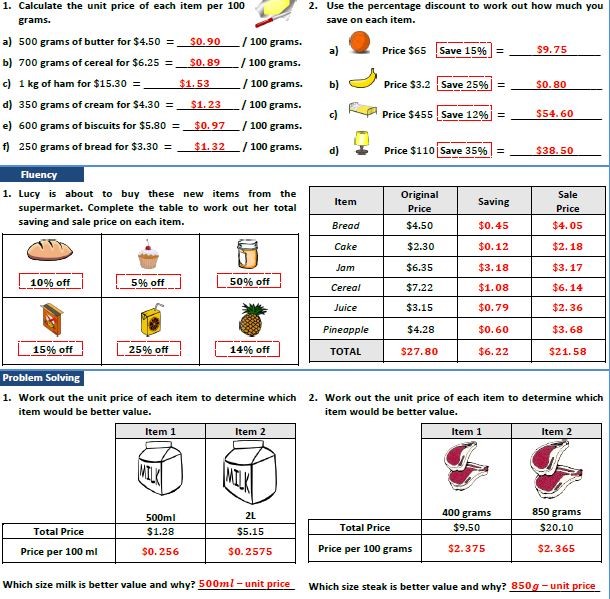
To investigate and calculate percentage discounts
To investigate and calculate ‘best buys’
Tasks:
Daily Maths Fluency:
Complete a column a day from the table below.
Level 1 – complete the ‘adding’ or ‘rounding’ task
Level 2 – as above, and work out the change
Level 3 – as above, and the percentages off
Try these tasks without a calculator.
Look here at the ‘mathsisfun’ website if you need some help with rounding numbers.
When finished, scroll to the end of this week’s learning from home tasks to check your answers.
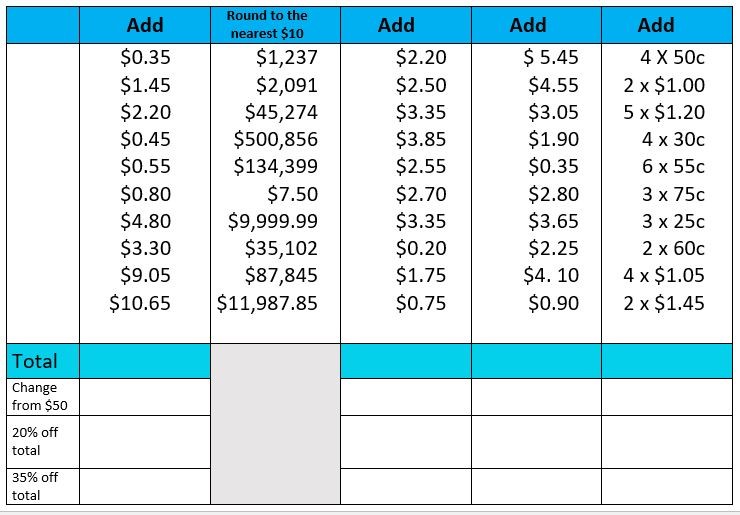
(10 minutes per day)
Pre Assessment
Log in to Essential Assessment.
Select the pre assessment in Number and Algebra called ‘Money and Financial Mathematics’.
Complete this pre assessment. Don't forget our school value of integrity when completing this task.
If there is a question you do not know how to answer, click ‘I don’t know’, rather than having a guess.
This will assist your teacher to see where you may need some help.
(30 minutes)
My Numeracy Goals
Having completed the ‘Money and Financial Mathematics’ pre assessment, you should now have some new Learning Goals.
Begin working on your personalised goals.
If you need to discuss your goals or if there are areas where you need support, please remember to let your teacher know.
(20 minutes x 3 days)
School Canteen Interactive
This session will be taught during Webex Essential on Wednesday.
After our Webex Essential meeting, complete the interactive activity, as instructed.
You can access the interactive activity here
(30 minutes)
Calculating ‘Best Buys’
Complete the following ‘best buys’ problems.
When finished, scroll to the end of this week’s learning from home tasks to check your answers.
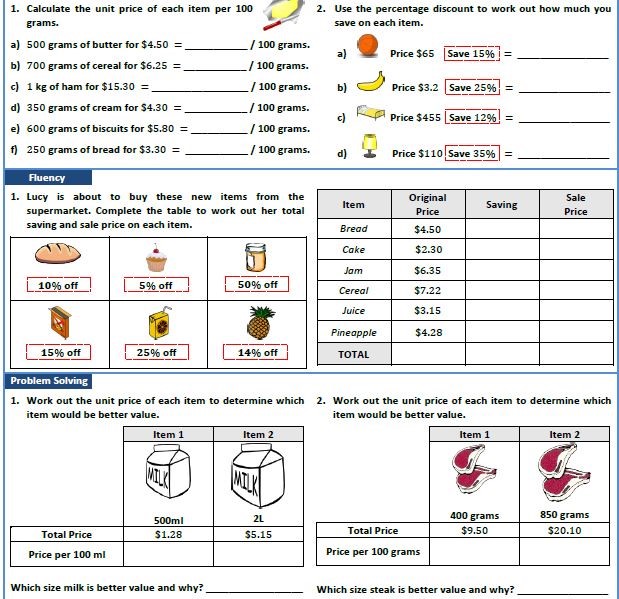
P.E. / Movement Breaks

To view the Leader Board after the second week click here.
Don’t forget to …
- Keep track of how much time you spend being active from Monday to Friday each week, 1 minute of any form of exercise = 1km.
For example, if you complete a total of 30 minutes exercise every day from Monday to Friday you will contribute 150 km! (30 x 5=150). - Keep track of the type of activity you participate in from Monday to Friday each week
e.g. walking, running, skipping, bike riding
Click here to enter your results by 3pm Friday.
Remember to demonstrate the school value of integrity when entering your results.
Bonus offer – If you would like to send a video of yourself performing the following skill via the Sentral Parent Portal, we will TRIPLE your result!
Juggle 3 balls (for a minimum of 10 seconds).
Good luck and remember every kilometre counts!
Inquiry – Design and Technology
How does the environment impact buildings and structures around the world?
Learning Intention:
To identify factors which influence the design and construction of buildings around the world
Task:
Buildings and their environment
This session will be reviewed during Webex Essential on Friday.
This term in Inquiry, we will be looking at the connections between buildings and the environment.
Look at the following pictures and write down your observations.
What do you notice about the environment, building materials etc.
How have the buildings been influenced by the environment?
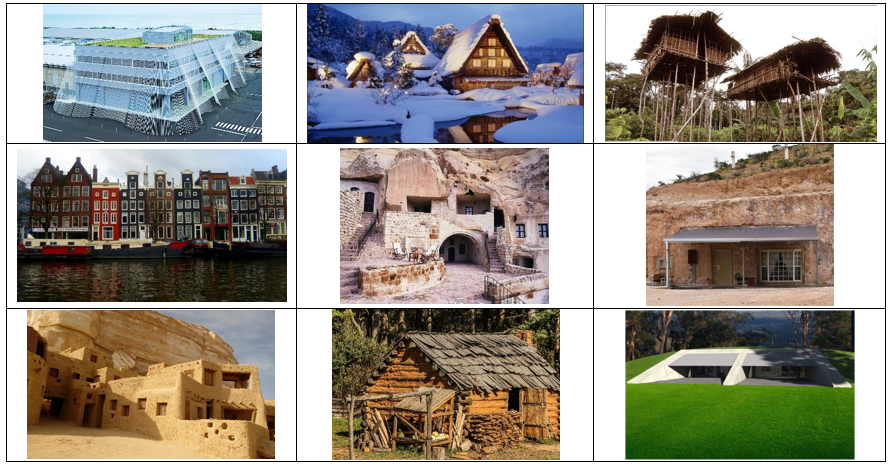
Think about your understanding of different natural disasters and weather types around the world.
Create a mindmap to show your thinking about the connections between buildings and the environment.
This will help us to come up with further questions to investigate during our inquiry work this term.
Self-Reflection:
Questions you may consider:
- How did I organise my time this week?
- Was I successful in completing the allocated tasks?
- Which tasks did I particularly feel proud of achieving?
- Challenges I had along the way
- What I could do more effectively next time
(10 minutes)
Click here for the other Specialist options.
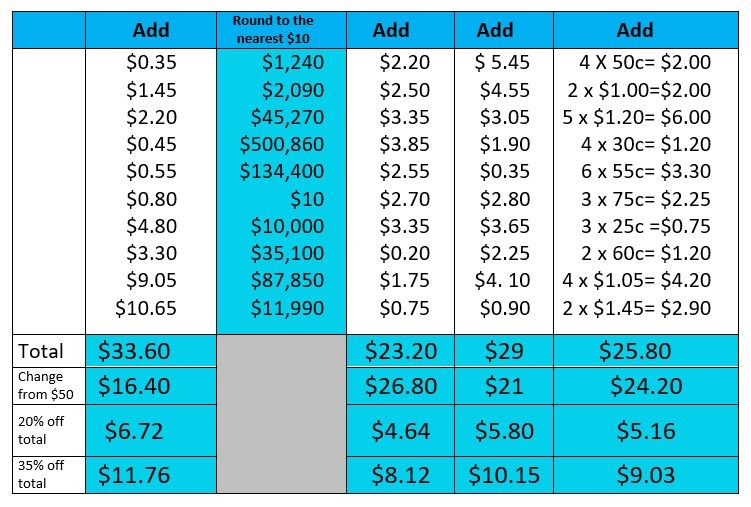
© Copyright Laburnum Primary School