
Year 1 Learning from Home Week 5 Term 3
Week beginning - 17 August 2020
Webex Essential Schedule
Below is a list of what we plan to do in our Webex Essential sessions:
Monday: Wellbeing
Tuesday: Maths - Features of a Number line
Wednesday: Reading - Features of a Non-fiction Text
Thursday: Writing - Sorting Personal Information (bring your mind-map to this session)
Friday: Maths - Shape Hunt
Work to be uploaded this week: Mind-map, number lines, spaghetti marshmallow tower designs
Wellbeing
Resilience, Rights and Respectful Relationships - 'Help Seeking'
This task needs to be completed in your blue scrapbook with the date written at the top of the page.
Learning Intention:
We are learning to identify how we can help our friends
Task:
- Read about Gus, what could you do to help him?
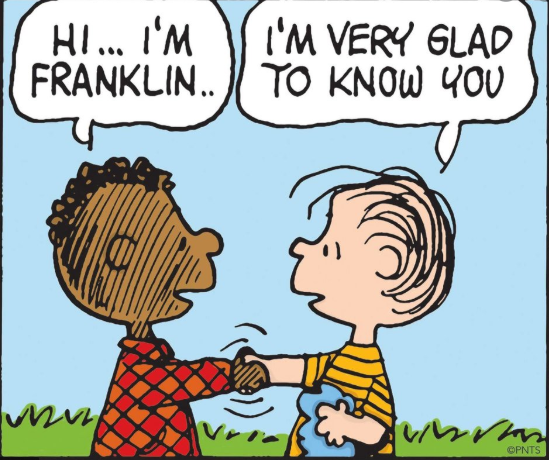
Draw a little comic strip that explains how you will help Gus.
Below is an example of a comic.
Don’t forget you will need speech or thought bubbles to show what Gus is saying or thinking.
Gus has been sitting by himself during lunchtime. He can’t find any friends to play with. What can other children do to help?
Self-reflection:
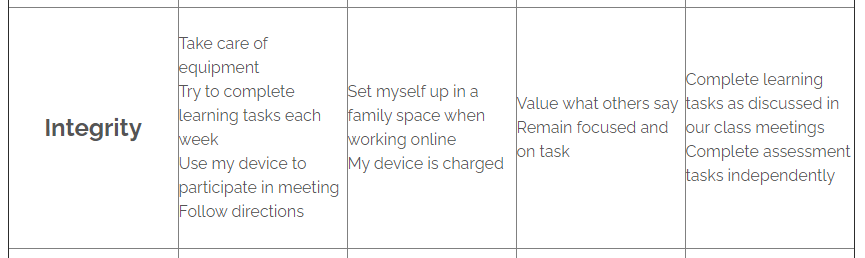
- Look at the Integrity matrix for ‘Expected behaviours for class meetings via Webex’.
At the beginning of the week, choose one thing that you think you need to work on (we will remind you during Webex Essential on Monday).
Write a sentence about how you went at the end of the week.
(15 minutes)
Reading
These tasks need to be completed in your pink lined book with the date written at the top of the page.
Learning Intention:
We are learning to build our reading stamina by reading independently for 20 minutes every day
Task:
- It is really important that when we read we are able to concentrate on our book for a long time.
Find a quiet, comfortable place in your house to read a Just Right Book that has been assigned to you on
Bug Club or Epic! (including books you may have already read).
This should look just like independent reading at school and you should do it every day.
(20 minutes per day)
Learning Intention:
We are learning to scan our books to look for exclamation marks before we read
Task:
- Exclamation marks (!) tell us when something exciting or surprising is happening in a text.
When we see an exclamation mark at the end of a sentence, it tells us how the author wants us to read the sentence.
It tells us to read that whole sentence differently.
We may speak louder, sound surprised or it can change how quickly we read.
As you are reading your Bug Club books this week, scan the page to look for exclamation marks, and check how the author wants you to read those sentences.
(20 minutes per day)
Learning Intention:
We are learning to identify a non-fiction text, using its features
Task: This task will be introduced in Tuesday’s Webex Essential session.
- Features of a non-fiction text
On Epic! we have assigned you the non-fiction book ‘Animals on the Farm-Pigs’.
We would like you to be reading detectives and go on a hunt for the features of a non-fiction text!
Use your sticky notes, and as you flick through the book write and draw the features that you find.
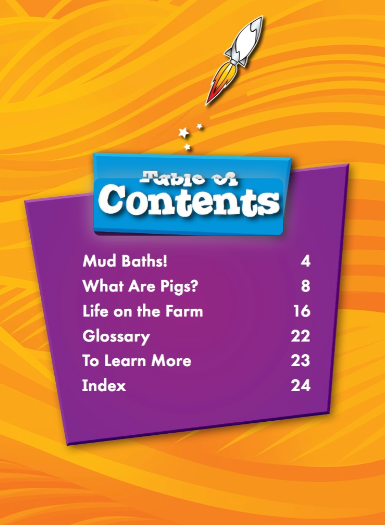
For example, on the first page you will find the contents page (pictured below).
(30 minutes)

Learning Intention:
We are learning to keep a log of our daily reading
Task:
- Everyday when you read, you are expected to record what you have read, the pages you have read and the date you read in your yellow reading log.
If you don’t have one, you can record this at the back of your pink lined book.
(5 minutes)

Writing
These tasks need to be completed in your pink lined book with the date written at the top of the page.
Learning Intention:
We are learning to identify the different types of writing that we know (poetry, procedure, word splash, letters, recounts, stories and lists)
Task:
- Free choice writing.
You can choose to write a three-line poem, an acrostic poem, a procedure, a letter, a recount, a story or a list.
You can do this task more than once!
Don’t forget to create some illustrations to add meaning to your writing.
(30 minutes)
Learning Intention:
We are learning to create a mind-map to gather information
Task:
- To write an information report, we need to gather information before we write. This is called research.
This week, we are preparing to write an information report about ourselves.
We will be creating a mind-map.
These are some questions you could ask yourself to gather information.- What’s your name?
- What do you look like?
- Where do you live?
- Who is in your family?
- What do you like?
- What don’t you like?
- What are your favourite foods/movies/sports?
- How old are you?
- When is your birthday?
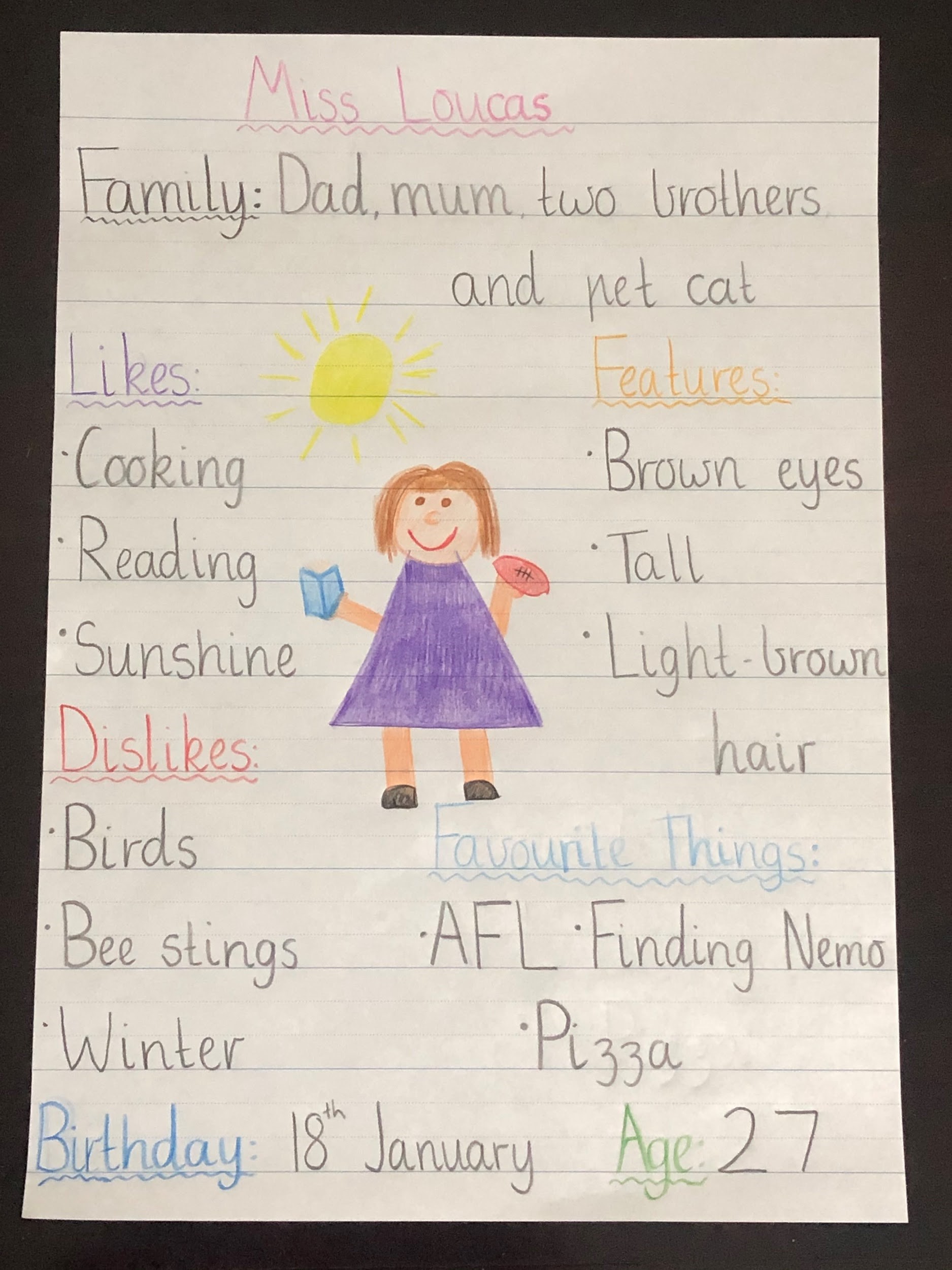
Below is a picture of Miss Loucas’ mind-map.
(50 minutes)
Success Criteria (what we are looking for to provide feedback)
- I can draw and colour a neat picture of myself
- I can include my name, what I look like, my birthday and my family members around my drawing
- I can include some other interesting facts about myself around my drawing
Please upload a picture of this work to Sentral, with your name on it, through the Sentral Parent Portal by Wednesday. Please bring your mind-map to Thursday’s Webex Essential session.
Learning Intention:
We are learning to sort information about ourselves into categories
Task:
- This task will be introduced in Thursday’s Webex Essential session.
Sorting Personal Information
Use your mind map to sort your information into the categories below.
We have included an example of a table below to show you how to set out your work.
Name Miss Loucas What I look like (appearance) Birthday Family members Hobbies Likes/Dislikes
Spelling/Handwriting
These tasks need to be completed in your pink lined book with the date written at the top of the page.
Learning Intention:
We are learning to correctly form each number
Task:
- Rewrite each of the numbers as shown below in your work book.
Make sure each number sits on the solid blue line.
Do your numbers look like this? You might like to do this every day!
(10 minutes)
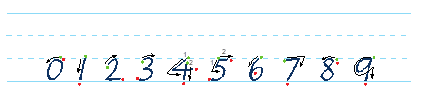
A note for left handers: tilt your book slightly to the right when writing so that you can see what you have written.
Learning Intention:
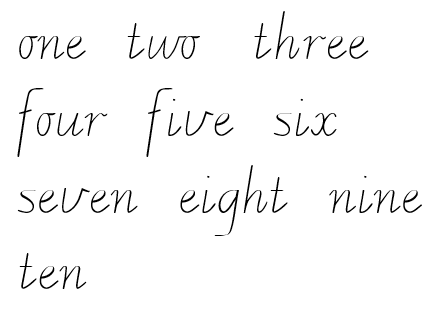
We are learning to accurately write the numbers one to ten as words
Task:
- Next to each number, write the numbers as words, from one to ten.
The words are written below for you.
Think about how you can remember to spell each of these words.
(15 minutes)
Maths
These tasks need to be completed in your blue scrapbook with the date written at the top of the page.
Learning Intention:
We are learning to read and identify odd and even numbers
Task:
- This week, we are learning to play a new fluency game called Odds and Evens.
Log into ClickView then watch a video of Miss Marshall playing the game Odds and Evens.
Shuffle a deck of cards (take out the Kings, Jacks, Tens and Jokers).
Queens are zero and an Ace is one.
If you don’t have a deck of cards, use the number cards from the resource pack that you cut out a few weeks ago.
Place the cards upside down in front of you.
Before you flip over a card, guess whether the number is odd or even.
If you guess correctly, keep the card. If your guess is incorrect, place the card back at the bottom of the deck.
You may have a partner you could play this game with.
If you play with a partner and guess incorrectly, your partner gets to keep the card, you keep the cards that you guess correctly.
The winner of the game is the person with the most cards.
Challenge: play the game by flipping over more than one card at a time and focus on reading larger numbers.
(10-20 minutes per day)
Learning Intention:
We are learning the features of a number line
Task:
- This task will be completed in Tuesday’s Webex Essential session.
Number Lines
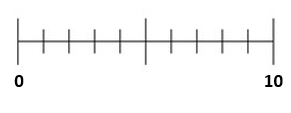
A number line is a way to represent a range of numbers.
Below are two pictures of number lines.
Look at the first number line, what is wrong with it?
Can you fix it by filling in the blank number line below it?
(30 minutes)


Learning Intention:
We are learning to place numbers on a number line
Task:
- Below are three number lines, a 0-10 number line, a 0-20 number line and a 0-100 number line.
Use the number cards from your resource pack.
Flip over four numbers and place them where they belong on the 0-10 number line.
How did you work out where to place the numbers?
Choose 4 numbers between 0-20. Place them where they belong on the number line.
How did you decide where these numbers went? What helped you?

Place the following numbers on the 0-100 number line; 30, 45, 75, 18, 99.
How did you decide where these numbers went?

Success Criteria (what we are looking for to provide feedback)- I can place numbers on a number line
- I can justify where I have placed the numbers
- I can complete this work independently
Please upload a picture of this work, with your name on it, through the Sentral Parent Portal by Thursday.
(40 minutes)
Learning Intention
We are learning to identify 2-D shapes and 3-D objects
Task
- This task will be discussed in Friday’s Webex Essential session.
Shape Hunt
Shapes are all around us. These can be 2-dimensional and 3-dimensional.
Do you know the difference between the two? Write down your answer in your workbook.
Your job is to go on a shape hunt around your house.
Below is an example.
What is it? Shape/Object Picture/Photo Sit Spot Circle 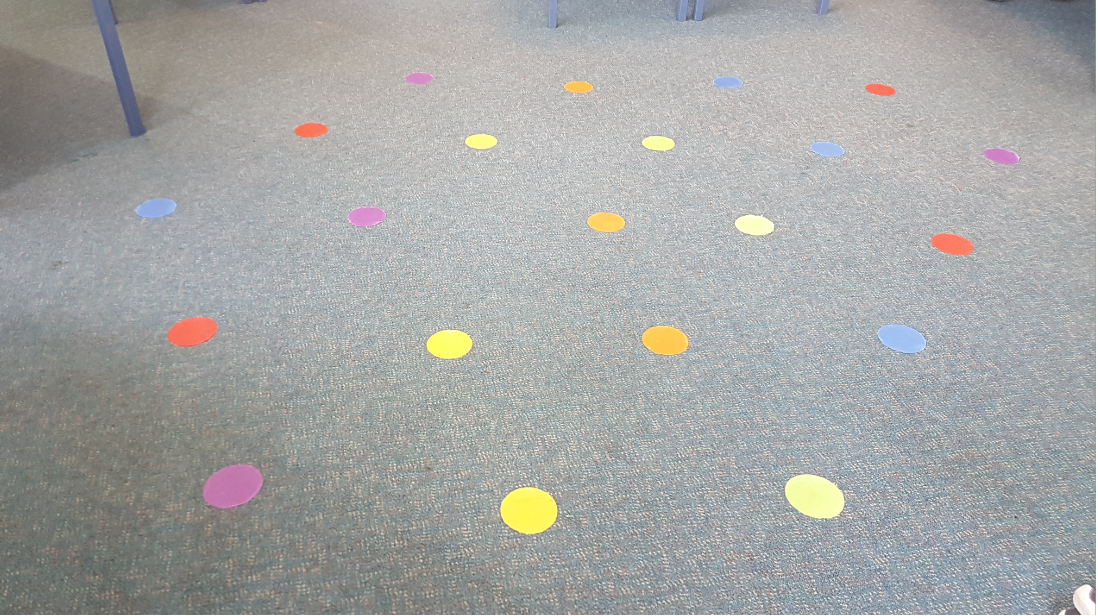
Window Rectangle 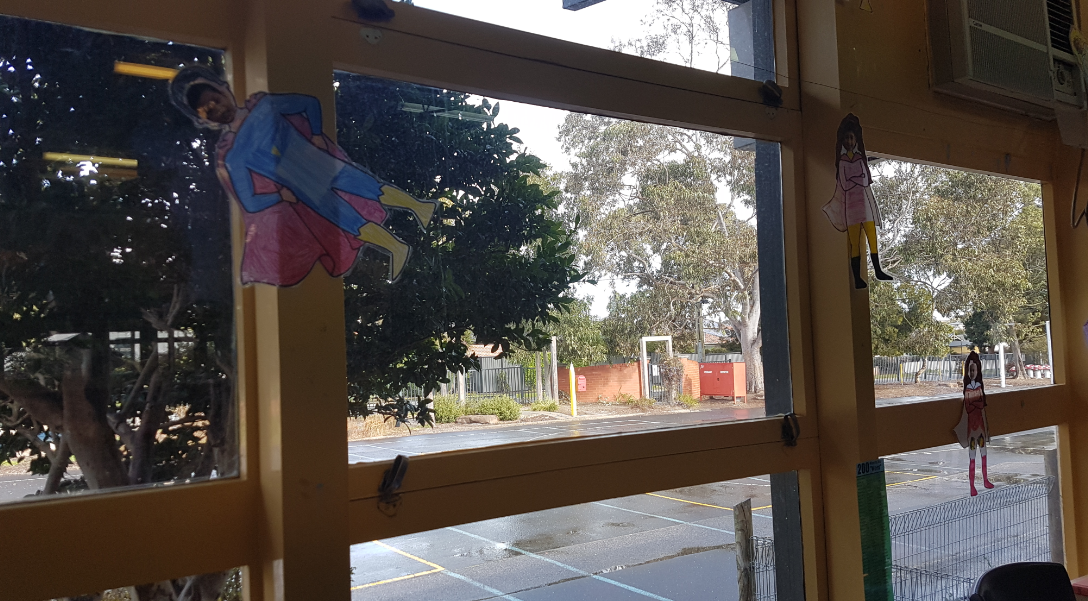
(50 minutes)
Inquiry/Science
These tasks need to be completed in your blue scrapbook with the date written at the top of the page.
Learning Intention:
We are learning to investigate how bread is made
Task:
- Answer the following questions in your workbook:
- How many different types of bread have you seen in the supermarket?
- What is your favourite bread to eat?
- Have you ever made bread at home?
- What ingredients do you need to make bread?
Watch Where Does Bread Come From? What did you learn? Write down any new information you learnt about bread in your workbook.
Optional task: Find a simple bread recipe or use the recipe in the Epic! book ‘Bread and Butter’ and make bread with the help of an adult. You might like to send your teacher a photo of your fresh homemade bread… and a slice!
Learning Intention:
We are learning to design the tallest marshmallow spaghetti tower we can
Task:
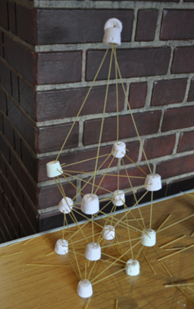
- You will be designing a tall tower to build made out of marshmallows and uncooked spaghetti.
(Ask an adult if they can please get you some spaghetti and marshmallows).
The challenge is to build the tallest tower without it falling or breaking, only using these two materials.
Your job is to draw two different designs.
These designs need to be uploaded to the Sentral Parent Portal.
An example is shown below. Your teacher would love to see a photo of it!
Success Criteria (what we are looking for to provide feedback)
- I can design at least two different spaghetti and marshmallow towers
- I can label my designs
- I can select the design that I think will work best and explain why
Please upload a picture of this work, with your name on it, through the Sentral Parent Portal by Thursday.
P.E./Movement Breaks
Learning Intentions:
We are learning to practise a range of PE skills, such as running, skipping, catching and throwing
We are learning to develop fitness and different sports skills to encourage us to be happy and healthy
The aim of this choice board is that you get to choose what you would like to do!
For each day, try to complete one of the following activity boxes.
Please click here to use the ‘Equipment Replacement list’ to help you create a range of sports equipment at home using household items.
Fitness/Sports Choice Board
| Jog for 5 minutes without stopping! Give yourself a break then repeat 3 times. Can you jog for a longer period of time before you have to stop? If so, time yourself and send your results to Mr Marikar or Mrs Yue-lamb via the Sentral Parent Portal. |
Tennis Ball Challenges! Click here to access your tennis ball challenges.
Remember if you don’t have access to a tennis ball you can search the Equipment Replacement List to make a ball to play with. |
Practise the following skipping tricks:
How many skips in a row can you get for each of these tricks? Now design your own skipping trick! Send your new skipping trick to Mr Marikar or Mrs Yue-lamb via the Sentral Parent Portal. |
|
Go Noodle Fun:
|
Make an obstacle course: Using a range of household items, try and create an obstacle course either inside your house or in the backyard. Try things like jumping over objects, crawling low on the ground, hitting a target or skipping. Time yourself and see if you can complete the course faster? Also consider making the course a little harder or easier on yourself depending on how you go the first time! Send your obstacle course to Mr Marikar or Mrs Yue-lamb via the Sentral Parent Portal. |
Basketball: Time yourself for 5 minutes and see how many goals you can score. Repeat and try and beat your score. If you don’t have a basketball or ring handy, just use a scrunched-up piece of paper and shoot it into a bucket or hat.
Log in to ClickView, to see how Mr M and Mrs Yue-Lamb used a hat as a hoop. Click here to watch!
Using any bouncy ball you have, do 50 dribbles on your right hand and 50 dribbles on your left hand. Create a dribbling routine using a left handed and a right handed dribble. |
Click here for the Specialist options
© Copyright Laburnum Primary School